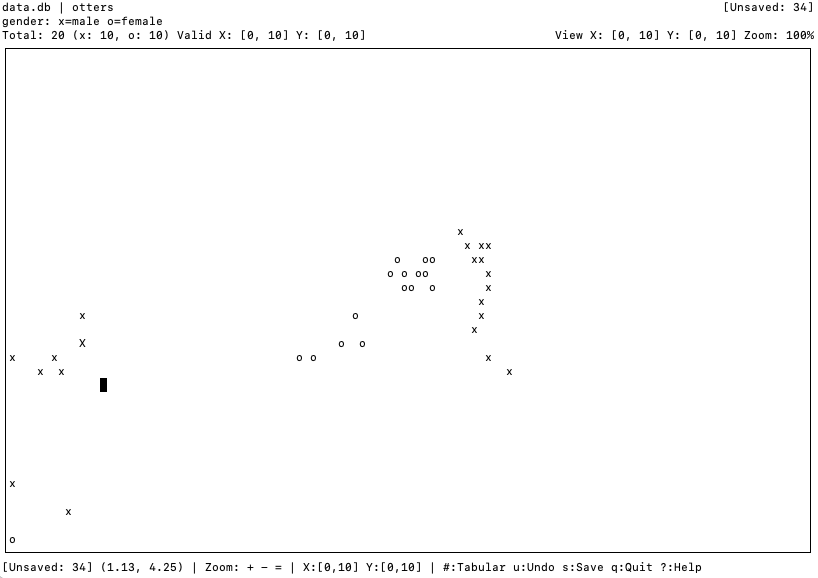
DataPainter lets you place and edit labelled points on a two-dimensional grid from the terminal. It saves coordinates and target values to SQLite, switches between grid and table views, and exports data as CSV.
Key Features
Interactive 2D Grid
Navigate and place data points on a 2D coordinate plane using simple keyboard controls. Support for zoom, pan, and viewport management.
SQLite Storage
Direct integration with SQLite databases. All data points are automatically saved with proper indexing for fast retrieval.
Dual View Modes
Switch between graphical viewport mode and tabular data view. Filter, sort, and edit points in both modes.
Undo/Redo
Full undo/redo support with change tracking. Review unsaved changes before committing to the database.
CSV Export
Export datasets to CSV format for use with other tools and analysis platforms.
Random Initialization
Generate random datasets with normal or uniform distributions for testing and prototyping.
Installation
Ubuntu/Debian (APT Repository)
# Add the GPG key and verify the fingerprint
wget -qO- https://packages.industrial-linguistics.com/datapainter/PUBLIC.KEY | \
  gpg --import --import-options show-only

# If the fingerprint looks correct, import it to your system
wget -qO- https://packages.industrial-linguistics.com/datapainter/PUBLIC.KEY | \
  sudo gpg --dearmor -o /usr/share/keyrings/datapainter-archive-keyring.gpg

# Add the repository
echo "deb [signed-by=/usr/share/keyrings/datapainter-archive-keyring.gpg] https://packages.industrial-linguistics.com/datapainter stable main" | \
  sudo tee /etc/apt/sources.list.d/datapainter.list

# Update package list and install
sudo apt-get update
sudo apt-get install datapainter
Pre-built Binaries
Download the latest release for your platform:
- Linux tarball: datapainter-linux-latest.tar.gz
- Debian packages: Browse packages
- All releases: GitHub Releases
Building from Source
Ubuntu/Debian
sudo apt-get update
sudo apt-get install -y cmake g++ libsqlite3-dev libncurses-dev

git clone https://github.com/solresol/datapainter.git
cd datapainter
cmake -B build -DCMAKE_BUILD_TYPE=Release
cmake --build build
sudo cmake --install build
macOS
brew install cmake sqlite3

git clone https://github.com/solresol/datapainter.git
cd datapainter
cmake -B build -DCMAKE_BUILD_TYPE=Release
cmake --build build
sudo cmake --install build
Quick Start
Basic Usage
# Create a new dataset
datapainter --database mydata.db --table experiments

# Open existing dataset
datapainter --database mydata.db --table experiments

# Import existing table for study
datapainter --database mydata.db --table mytable --study
Keyboard Controls
- Arrow keys: Move cursor
- x / o: Place x or o points
- Space: Delete point under cursor
- + / -: Zoom in/out
- =: Fit to viewport
- #: Switch to tabular view
- u: Undo last change
- s: Save changes
- q: Quit
- ?: Show help